System Design: Resilient Multi-File Upload Architecture
Problem & Requirements
Frontend: A web interface that allows users to upload a batch of files. The UI allows users to track the status of each file independently—success (checkmark), failure (cross), or in progress.
Backend: Represented as an "Empty Box." The internal architecture is undefined.
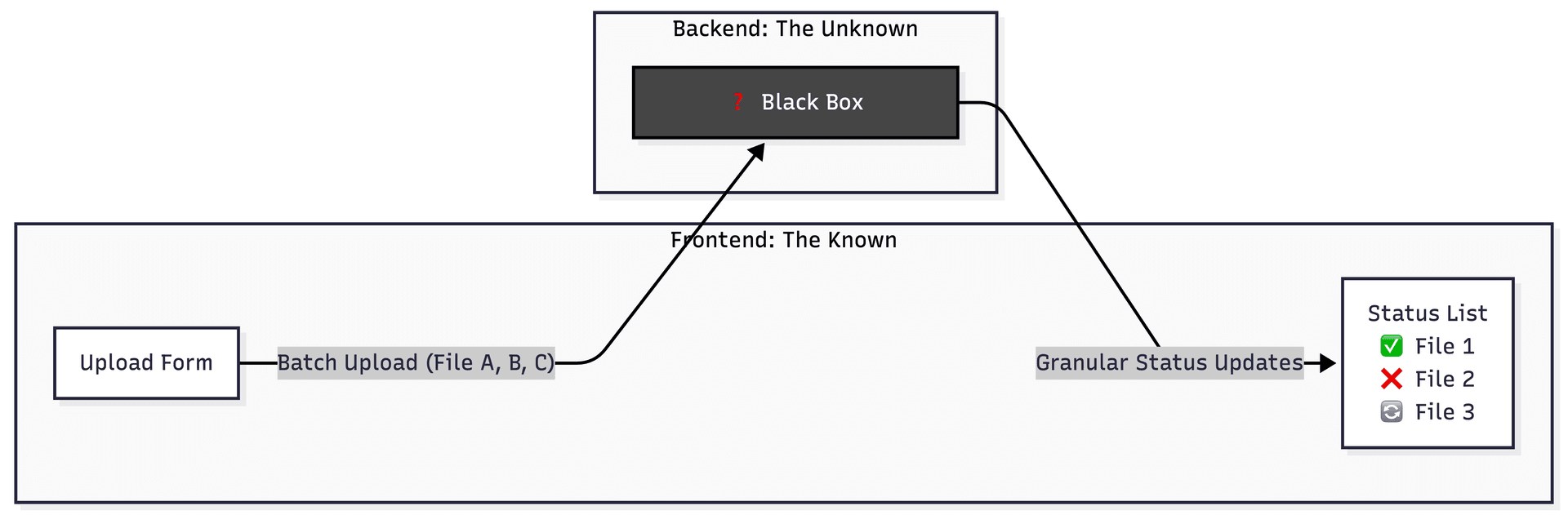
The Challenge: You must design the architecture inside the "Backend Box" to support this flow.
The system needs to:
- Handle Batch Uploads. Support multiple files arriving simultaneously without crashing the server.
- Ensure Granularity. Track the status of each file independently.
- Explain Failures. It has to account for why "some files go well and others don't" (validation errors, corruption, timeouts).
- Scale. It must be robust enough to handle large files and high concurrency.
I have seen many teams struggle with file uploads. Most start by sending a multipart/form-data request directly to a web server. This works for a profile picture. It fails miserably when you need to process a batch of files.
To solve the problem presented Batch Upload -> Processing -> Granular Status, we must move away from a monolithic "upload to web server" approach.
1. High-Level Strategy
The Core Philosophy: Asynchronous, Event-Driven Architecture.
2. The Architecture (Filling the "Backend" Box)
Here is the flow I would draw inside that backend box, and the justification for each component.
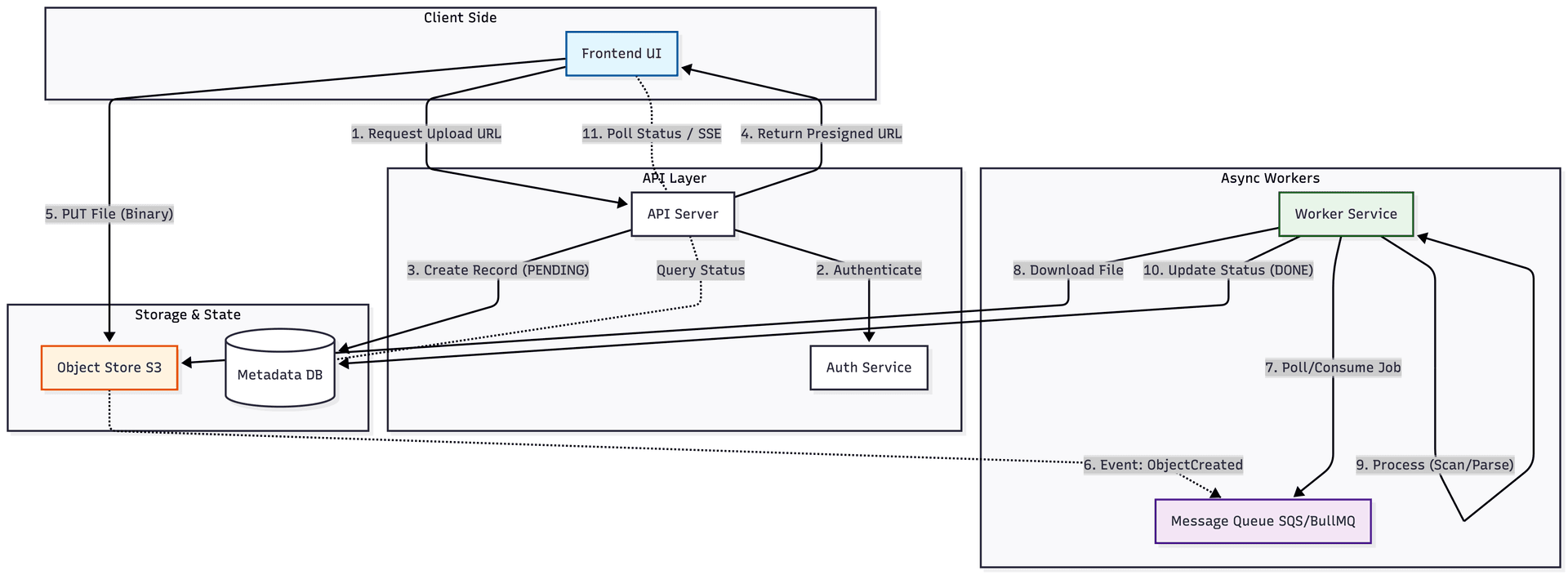
Step A: The Upload Handshake (Presigned URLs)
First, the Frontend sends a request to the API (POST /initiate-upload) with the file metadata (names, sizes).
If you tie up your API threads with binary data transfers, you are effectively paying for expensive compute resources to act as a dumb proxy. That is a recipe for a bottleneck. The better way is to move the heavy lifting away from the request cycle.
Instead of the server receiving the file, the server grants the client permission to talk directly to the storage provider. I typically use a POST endpoint to initiate the upload. The backend generates a signed URL. This URL is cryptographically bound to a specific resource path and expires quickly.
This approach ensures the API remains thin. The browser handles the multi-gigabyte stream to the object store. Your server only handles a few kilobytes of JSON metadata.
A core motivation is to communicate directly with Amazon S3 to benefit from the built-in scalability.
The Backend, which holds the Cloud provider's Secret Keys, constructs a specific URL for an S3 object. It cryptographically signs this URL with its secret key, embedding:
- Action: Only
PUTis allowed (notGETorDELETE). - Resource: The specific path (e.g.,
/uploads/user_123/file.jpg). - Expiration: A short valid window (e.g., 5 minutes).
It returns this long, query-parameter-filled URL to the Frontend.
Finally, the Frontend uses this URL to upload directly to Cloud Storage. The storage provider validates the signature; if it matches, the upload is accepted.
Why?
Mainly Scalability. We don't want file binary data passing through our application servers. Uploading large files ties up server threads and memory (RAM). By using Presigned URLs, the client uploads directly to the Object Store, bypassing our compute layer entirely. It's also cleaner for Security, since the URL is time-bound and specific to that resource.
Step B: The Storage Layer (Object Store)
The Frontend performs a PUT request directly to the Object Store (S3, GCS, Azure Blob) using the URLs from Step A.
Why?
Object stores are incredibly durable (99.999999999%) and much cheaper than block storage attached to servers.
Step C: Event Triggering (Decoupling)
Once the file lands in the Object Store, we need to trigger processing. We have two main options:
- Push: The Object Store triggers a Lambda or sends a message to a Queue (
SQS/RabbitMQ) via an event notification (e.g.,s3:ObjectCreated). - Client Confirmation: The Client calls
POST /upload-complete, which places a job in the Queue.
Decision: I strongly prefer Option 1 (Infrastructure-based events). If the user closes the browser immediately after the upload reaches 100%, Option 2 fails. Option 1 ensures that if the file exists, it will get processed.
Step D: The Job Queue (Buffering)
The upload event lands in a Message Queue. You generally have two choices here:
AWS SQS (Simple Queue Service)
- Type: Fully Managed Serverless.
- Pros: Zero maintenance, infinite scaling, integrates natively with
S3events. - Cons: Basic logic.
- Verdict: Best for pure AWS architectures where low maintenance is priority.
BullMQ (Redis-based)
- Type: Node.js library requiring a
Redisinstance. - Pros: Advanced features out-of-the-box (Rate limiting, Delayed jobs, Progress tracking).
- Cons: You must manage the
Redisinfrastructure. - Verdict: Best for complex workflows where you need fine-grained control.
If you use SQS, you verify "Event Notifications" on the S3 bucket to target the SQS queue directly. No code required.
If you use BullMQ, your API Service acts as the producer, connecting to ElastiCache (Redis) to add the job. Your Worker Service maintains a persistent connection to process them. Note that running BullMQ on AWS Lambda is tricky because Lambda freezes execution contexts, which can break Redis listeners.
Why use a queue?
It handles Traffic Spikes. If a user uploads 1,000 files at once, we don't want to crash our processing servers. The Queue allows us to "smooth out" the load. It also gives us Retry Logic for free—if a specific file fails to process, the Queue handles retries (and eventually Dead Letter Queues) automatically.
Step E: The Workers (Processing)
A fleet of worker services (completely separate from the API servers) pulls messages from the Queue. They download the file, perform the business logic (parsing, virus scan, resizing), and write the result to the Database.
Why?
Separation of Concerns. Heavy, CPU-intensive processing shouldn't degrade the performance of your IO-intensive API.
Step F: The State Machine (Database)
We need a database table to track the state of each file. The schema needs FileID, BatchID, UserID, Status (PENDING, PROCESSING, COMPLETED, FAILED), and ErrorMessage.
Why?
The frontend needs to show those granular checks and crosses. We can't rely on memory; we need a persistent state that survives server restarts.
Step G: Closing the Loop (Frontend Updates)
How does the Frontend know to switch the icon from "Spinning" to "Checkmark"?
You could use Server-Sent Events (SSE) or WebSockets. Or you could fall back to Short Polling (every 5 seconds).
Decision: For a file upload specifically, polling is often acceptable and simpler to implement. However, if this is a "real-time" collaborative dashboard, use SSE.
3. Summary of the Flow
- Frontend requests permission to upload.
- API saves "Pending" state in DB and returns Secure Upload URL.
- Frontend uploads file directly to Cloud Storage.
- Cloud Storage fires event to Queue.
- Worker picks up job, processes file, and updates DB to "Success" or "Fail".
- Frontend polls DB (or receives push) to update UI UI with Check/Cross.
4. Addressing "Why files fail" (The Error Handling)
Validation Failure: The worker detects the file is a .exe renamed as .jpg (Magic number check).
- Action: Mark DB status as
FAILED, reason: "Invalid File Type".
Processing Failure: The file is corrupted.
- Action: Mark DB status as
FAILED, reason: "Corrupt Data".
System Failure: The worker crashes mid-process.
- Action: The Queue visibility timeout expires, the message becomes visible again, and another worker retries. If it fails 3 times, it moves to the Dead Letter Queue, and the engineering team gets an alert.
Mermaid Diagram
References & Resources
- AWS S3 Presigned URLs: Official Documentation
- BullMQ Documentation: Github Repository
- Asynchronous Processing Guide: AWS Prescriptive Guidance